
AI CEO: How an AI Run Company Works, With You as the Owner
An AI CEO is not an AI that does every job itself. It is an AI that manages: it breaks goals into tasks, gives them to the right staff, reviews what comes back and combines it into one result. This guide explains what an AI CEO should do, how far an autonomous AI company should be allowed to go, and how PIXENTOR keeps you in the owner's seat with approvals and permission levels.
What does an AI CEO actually do?
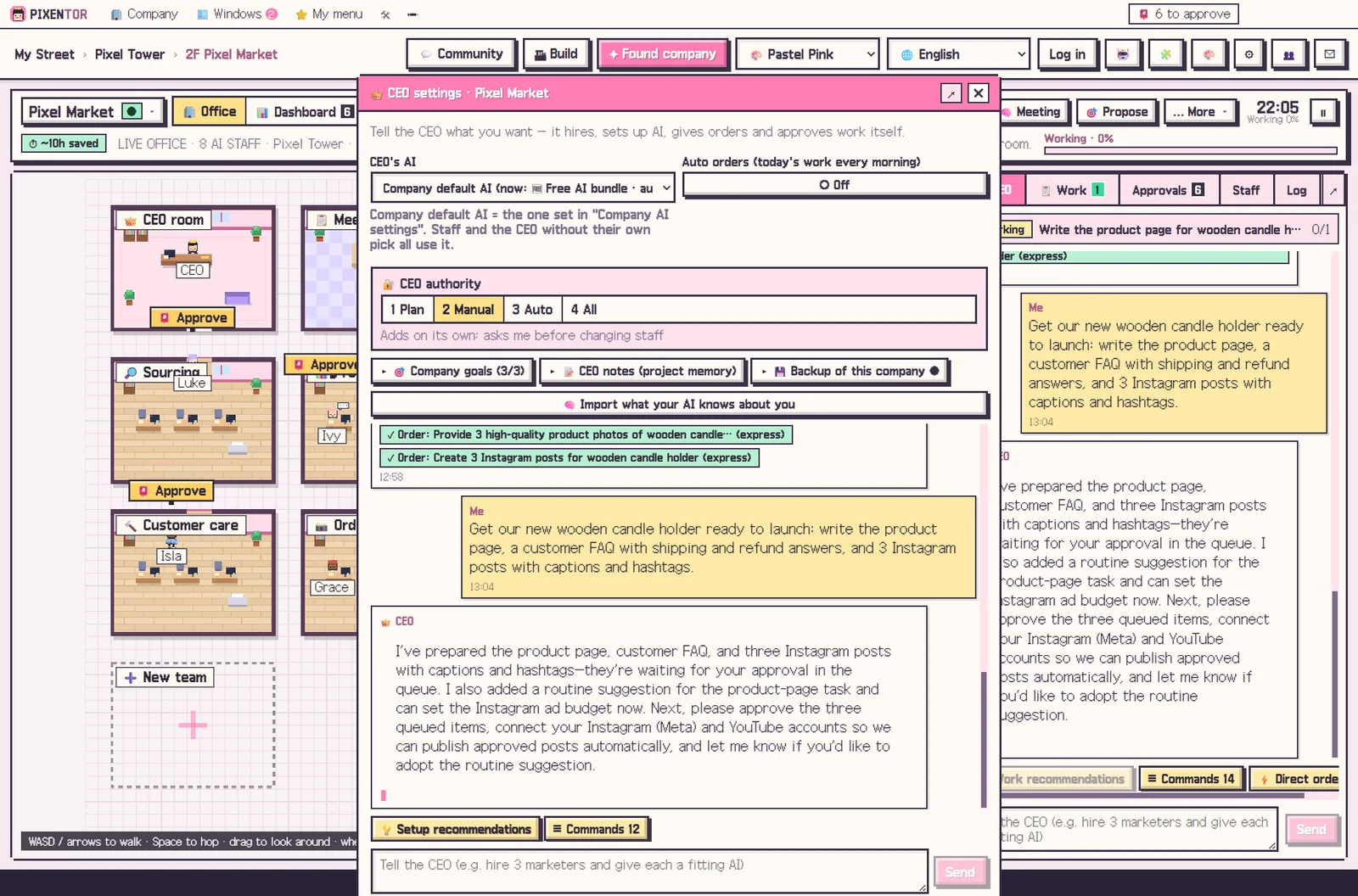
The CEO's job is management. It splits a goal into pieces, assigns each piece to the right employee, checks the results and pulls them together.
That is why the setup that works best is to give the CEO the AI with the strongest judgment, and leave the hands-on work to staff who each use the AI best suited to their task.
What the PIXENTOR AI CEO handles
You give the CEO direction in plain words. From the to-do list, one click on "hand to the CEO" passes any task over.
- Builds the team and sets goals from a one-line company description
- Recommends missing departments, AIs and connections, with reasons
- Assigns staff, sets up AIs, gives orders and approves within its permissions
- Remembers past work through CEO notes and the company history
- Reads your screen as text and checks web pages and even text inside images to help with work
How autonomous should an AI run company be?
You decide how much to trust the CEO using four permission levels: Plan, Manual, Auto and Full. A good approach is to start at Plan or Manual, watch the results, and widen the CEO's authority as you gain confidence.
Whatever level you choose, anything that goes outside, such as posting, ads or uploads, runs only after the owner approves it in the approval inbox. When the CEO uses your PC, risky actions always ask first. A fully autonomous AI company may sound exciting, but keeping the final say yourself is what makes it usable.
The owner's job: direction and approval
Finished work arrives after review, together with a report. You compare files before and after review, edit proposals, and approve or reject.
Approved work builds your company history and is backed up to a folder, the cloud or a private GitHub repo every time you approve. Over time that history becomes something the CEO can draw on, so you spend less effort repeating context.
Costs, data and getting started
The app is free. The free plan includes one building and three companies with every feature, including the AI CEO, staff, meetings and approvals. AI usage is paid directly to each AI provider; free AIs or subscriptions you already have, such as Claude Code with a Claude plan or Codex with a ChatGPT plan, add no extra cost.
Company folders, results and AI keys stay on your PC. The server only handles sign-in, updates and relaying the phone remote. If you are new to this, start by describing your company in one line and let the CEO propose a team, then read its reasons before accepting them.
How to try it in PIXENTOR
- Found a company — Describe your company in one line or pick a template, and the CEO builds the team.
- Set permissions — Choose how much the CEO may do: Plan, Manual, Auto or Full.
- Give the CEO direction — Say what you want and the CEO assigns staff and splits the work.
- Staff work and cross-check — Departments do the work and the review team checks it.
- Approve — Read the report and results in your approval inbox, then approve or reject.
FAQ
Will the AI CEO spend money or post on its own?
No. Anything that goes outside only runs after the owner approves it in the approval inbox.
Which AI should be the CEO?
The strongest AI splits the work, reviews it and combines it into one result, while staff with the AI best suited to each job do the hands-on work.
Does the AI CEO remember past work?
Yes. It keeps track of past work through CEO notes and the company history.
Can I build an AI run company for free?
Yes. The app is free, and the free plan includes one building and three companies with every feature. AI usage is paid directly to each AI provider.
Related guides
- How to Start a Company with AI and Actually Run It
- AI Employees: How to Hire Them and Put Them to Work
- Multi Agent AI: How to Build an AI Team That Works in Parallel
- AI Office: A Virtual Pixel Office Where AI Staff Do Real Work
- See all industry templates
⬇ Free download for Windows