
AI Office: A Virtual Pixel Office Where AI Staff Do Real Work
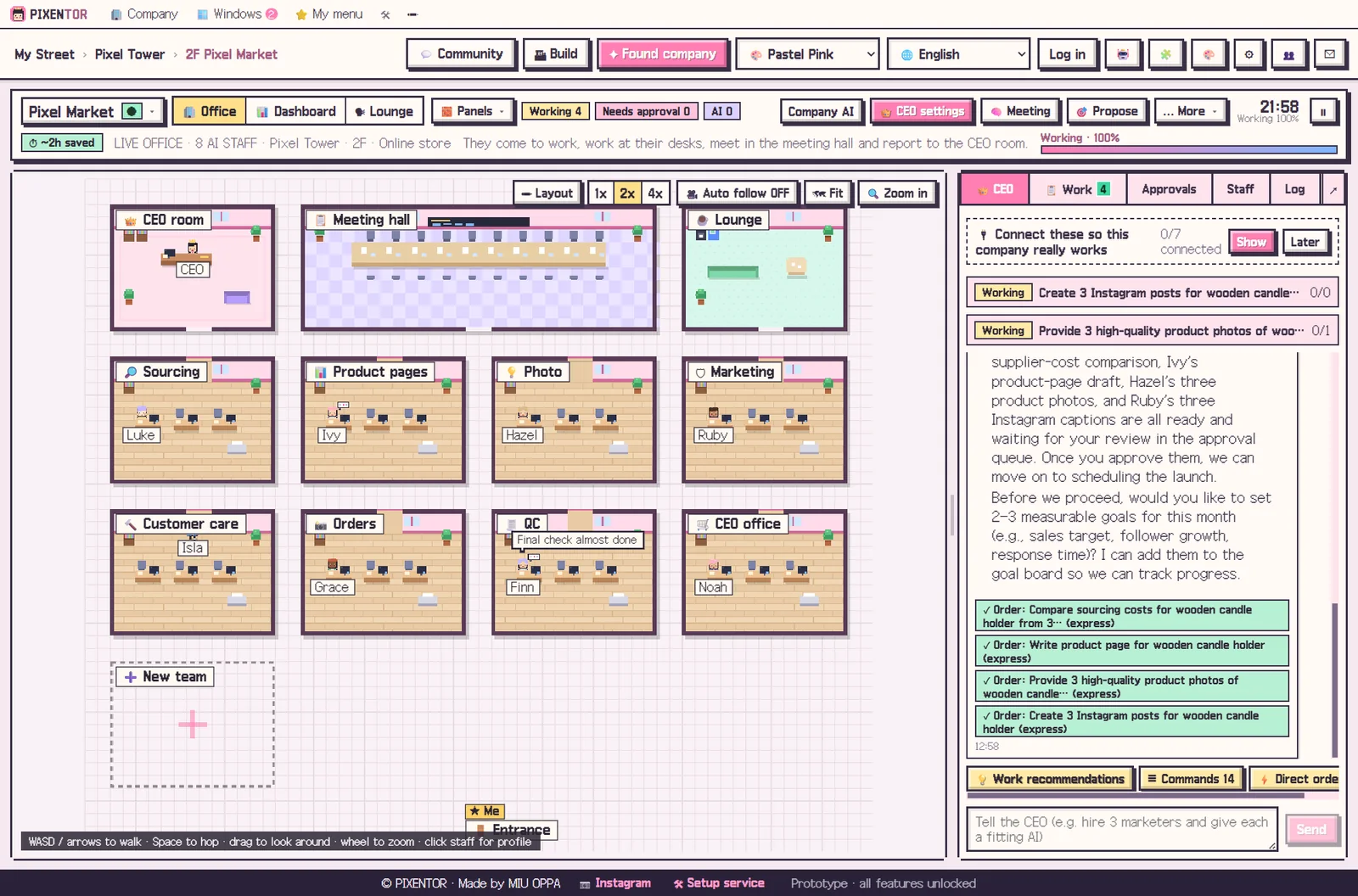
Run several AI agents at once and it quickly gets hard to tell what is in progress and what is stuck. Reading logs line by line is tiring. An AI virtual office turns that status into something you can see at a glance: rooms for teams, desks for staff, speech bubbles for what each one is doing. PIXENTOR is a free Windows app that builds that AI office as a pixel-art building on your PC, and lets you give orders right from the screen.
Why an AI virtual office helps
Status dashboards and logs tell you what happened, but they are not pleasant to watch all day. A visual office shows the same information in a way you can take in instantly: who is busy, which team is waiting, where the work is piling up.
A nice view is not enough on its own, though. It is only useful if you can act from it, changing a staff member's AI, handing over a task or approving a result without leaving the screen.
The PIXENTOR live office
Every team has a room and every employee has a desk. Speech bubbles show what they are working on right now. Click anyone to change their profile, their AI or their skills on the spot.
The dashboard puts goals, to-dos, work in progress, approvals, staff, outputs and backups on one screen. Any to-do can be handed to the CEO with a single click.
Is it just a pixel office game?
It looks like one, and decorating it is half the fun, but it is not a pixel office game or an AI company simulator in the usual sense. The staff in the building use real AIs to research, write, create and review, and their results arrive in your approval inbox as files you can actually use.
You can still make it your own:
- 15 themes
- Build your own theme from colors and pictures, or ask the AI to make one
- Expansion packs like Office Pro, AI robot staff and animal staff
- 10 languages, with staff names that change to match
Outside the office: the plaza
Owners can open their companies on the street and visit each other. Walk and chat together in the plaza, and share know-how, skills and company setups on the board, auto-translated into 10 languages.
Only companies you choose to make public appear on the street. Files, results and AI keys on your PC are never made public. Expansion packs can be turned off at any time and everything goes back to how it was, and themes and packs you make can be shared in the market.
Why seeing the work changes how you manage it
When progress is visible, problems are easier to spot early. If one team's room is busy while another sits idle, that is a hint the work is waiting on something. If a staff member's bubble has said the same thing for a long time, you can click them, check their AI or skills, and adjust.
The AI lounge adds another layer: you can read everything staff said to each other while they worked. Between the office view, the dashboard and the lounge, you always know what your AI team is doing, without digging through technical logs.
How to try it in PIXENTOR
- Found a company — Pick a template and your building gets team rooms and staff desks.
- Talk to the CEO — Tell the CEO what you need in the chat.
- Watch staff work — Follow progress through speech bubbles and read staff conversations in the AI lounge.
- Approve — Check results in the approval inbox and approve them.
FAQ
Is this pixel office just a game?
No. The staff in the office use real AIs to research, write, create and review, and their results come to your approval inbox.
Does decorating the AI office cost money?
The 15 themes and theme maker are available on the free plan, and you can upload and download packs in the market.
Can I visit other people's AI offices?
Yes. You can visit public companies in the plaza. Only companies whose owners turn on public mode appear.
Can I check the office from my phone?
Phone remote, for approving and giving orders on the go, is part of the PRO plans, which are coming soon.
Related guides
- How to Start a Company with AI and Actually Run It
- AI Employees: How to Hire Them and Put Them to Work
- AI CEO: How an AI Run Company Works, With You as the Owner
- Multi Agent AI: How to Build an AI Team That Works in Parallel
- See all industry templates
⬇ Free download for Windows