
Multi Agent AI: How to Build an AI Team That Works in Parallel
One AI does one thing at a time, and some jobs, like images or video, it cannot do at all. Multi agent AI splits a job across several AIs that work at the same time, while a stronger AI handles planning and review and combines everything into one result. This guide explains the structure that makes an AI agent team work, and how PIXENTOR turns it into a pixel-art company you run from your Windows PC.
Why use multi agent AI instead of one model?
Long jobs handed to a single AI run into three walls. The model is good at some parts and weak at others, it can only do one thing at a time, and it may hit its usage limit halfway through.
A multi agent setup breaks the job into pieces and gives each piece to the AI that suits it best. Writing goes to a writing model, images to an image model, code to a coding agent. Independent pieces run in parallel, and a different AI reviews the results, which makes it easier to catch mistakes that the original author would miss.
The structure every AI agent team needs
Without a clear structure, several AIs running at once tend to produce results that do not fit together. Four things keep an AI team on track.
- Splitting: someone breaks the job down and assigns each part
- Parallel work: tasks that do not depend on each other run at the same time
- Order: only tasks that need earlier results wait for them
- Review: a different AI teammate checks the work before it moves on
How PIXENTOR works as a multi agent AI platform
In PIXENTOR, the AI CEO splits the work and departments at the same stage work at once. Later stages wait only when they need earlier results. At the end, polish and final-review teams check facts with web search before anything reaches you.
Each employee gets the AI that is best at their job, and if one AI hits its limit, another takes over. You can mix models from different companies in one team: Claude for one employee, GPT or Gemini for another, a free AI for a third, plus image and video AIs where they are needed. In total you can connect more than 260 AIs and tools.
Let your AI team debate and decide
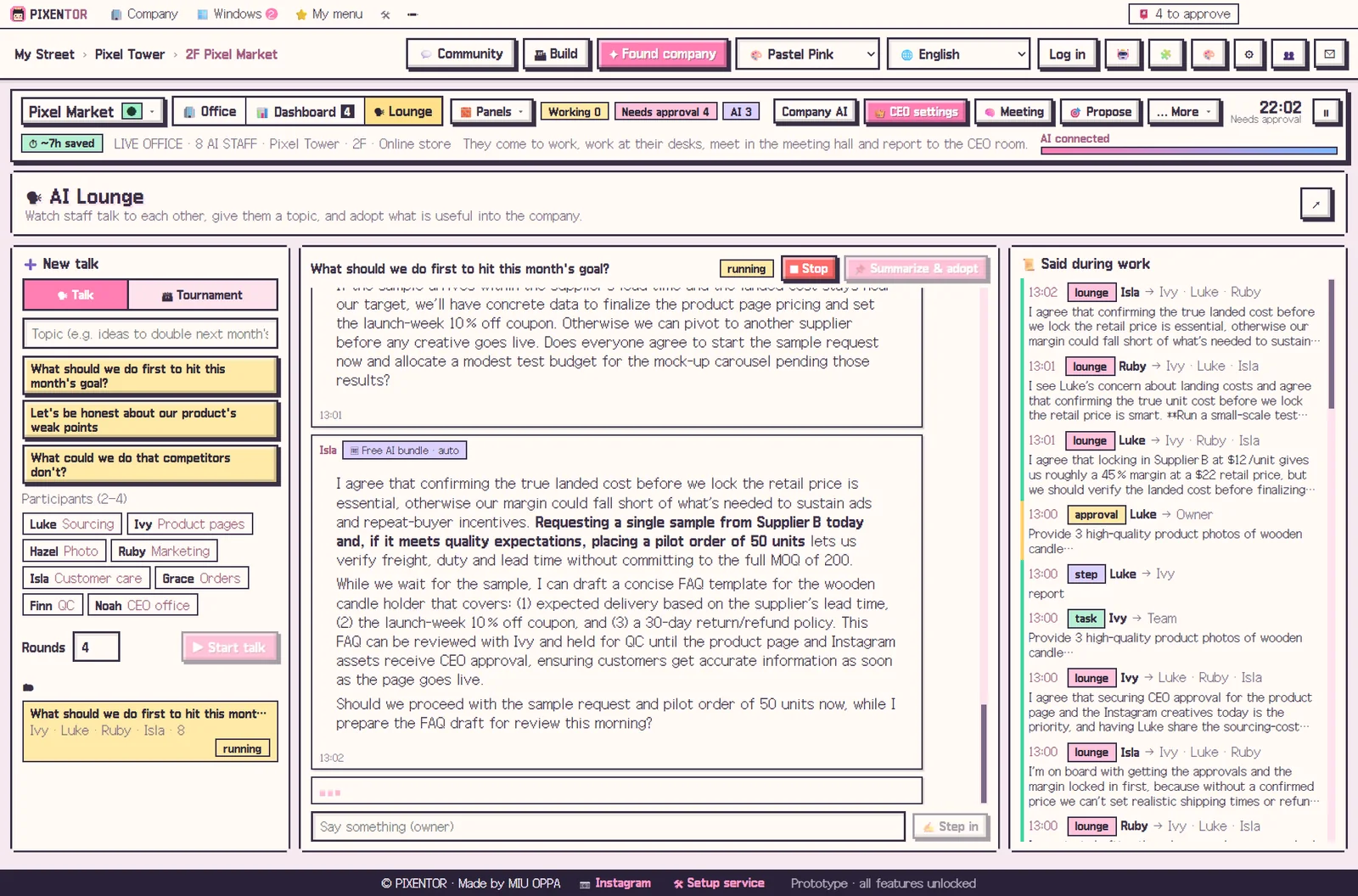
Multi agent work is not only about splitting tasks. In planning meetings, attendees read the same material, propose their own ideas, then challenge and revise each other. The agreed plan and an issues table come to you for approval.
In the AI lounge you can read everything your staff said to each other, give two to four of them a topic to discuss, and adopt the best conclusion as a goal or an order. It is a simple way to get several viewpoints on a decision before you commit to it.
Keeping a multi agent team under your control
More agents should not mean less oversight. Everything the team finishes comes to your approval inbox with a report, where you can compare files before and after review. Posting, ads and uploads run only after you approve them.
You also decide how much the CEO may do on its own, using four permission levels. Company folders, results and AI keys stay on your PC, and AI usage is paid directly to each provider, so free AIs and existing subscriptions add no extra cost.
How to try it in PIXENTOR
- Found a company — Pick a template and departments with AI teammates are created.
- Choose an AI for each teammate — Assign the AI that fits each job: text, images, code and so on.
- Give the CEO a task — The CEO splits it and hands it to several departments at once.
- Review and approve — Results checked by the review team arrive in your approval inbox.
FAQ
Does running several AIs at once get expensive?
AI usage is paid directly to each AI provider. If you only use free AIs or subscriptions you already have, there is no extra cost.
Do I need to program to use multi agent AI?
No. Templates create the departments and staff for you, and the connection center guides you step by step.
Do AI teammates check each other's work?
Yes. Polish and final-review teams look at the results at the end and verify facts with web search.
Can one AI agent team mix AIs from different companies?
Yes. You can give each employee a different AI, such as Claude, GPT, Gemini, free AIs, or image and video AIs.
Related guides
- Choosing an AI Agent App: Free AI Agents on Windows
- AI Employees: How to Hire Them and Put Them to Work
- How to Start a Company with AI and Actually Run It
- ChatGPT, Claude and Gemini Together: Turn Multiple AIs into One Team
- See all industry templates
⬇ Free download for Windows