
How to Start a Company with AI and Actually Run It
An AI company is a business where AI models take on separate roles and a human sets the direction and approves the results. The point is not to ask one AI to do everything. It is to build a structure where work gets split up, handed to the right AI, and checked before it leaves the building. PIXENTOR is a free Windows app that shows that structure as a pixel-art building on your own PC, with an AI CEO in charge and you as the owner.
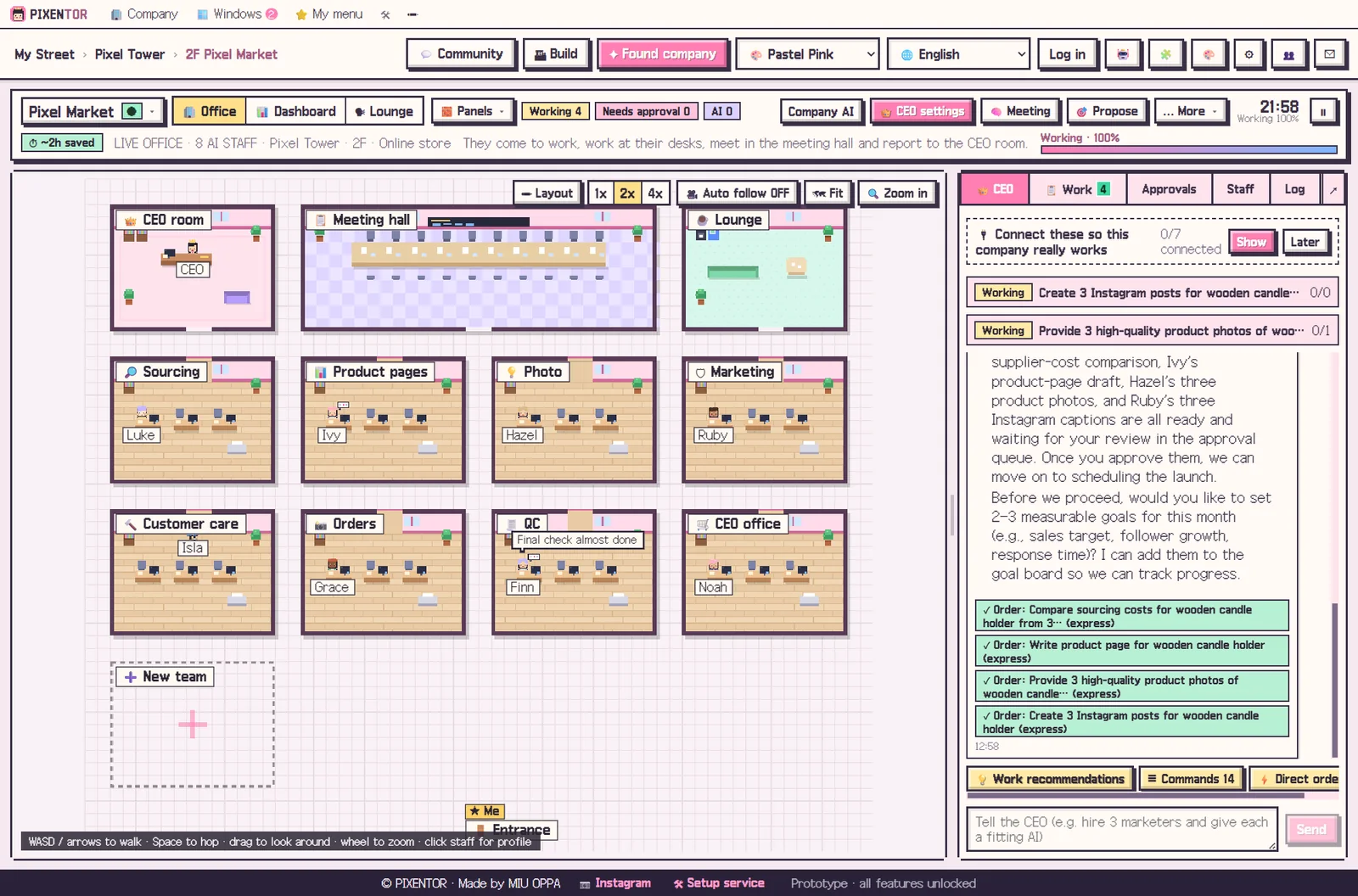
What changes when you start a company with AI
Most people use AI through a single chat window: ask a question, get an answer, copy it somewhere else. As soon as a job grows, you end up stitching things together by hand. Research goes in one tab, the draft in another, images come from a third tool, and you are the one checking that it all lines up.
When you start a company with AI, even that stitching becomes a role. A planner, a writer, a designer and a reviewer each focus on one part of the job and pass their work along. Your job shrinks to the decisions that actually need a person: what to work on, and whether the result is good enough to use.
Three things every AI company needs
Running an AI company well comes down to three habits. Skip one and the results tend to drift, repeat mistakes, or go out the door before anyone has looked at them.
- Roles: give each kind of work the AI that is best at it, instead of one model for everything
- Review: have a different AI check the result before it moves on
- Approval: anything that goes outside the company waits for a human decision
How PIXENTOR lets you run a company with AI agents
You describe your company in one line, and the AI CEO builds the team, sets goals, and recommends any missing departments, AIs or connections, with a reason for each. CEO notes and the company history keep track of what has already been done, so you do not have to explain everything twice.
Departments at the same stage work at the same time, and later stages wait only when they need earlier results. Polish and final-review teams check facts with web search at the end. Finished work arrives in your approval inbox with a report, where you compare files before and after review, edit proposals, and approve or reject.
If you would rather not start from a blank page, pick one of 40 industry templates, from online shop and marketing agency to YouTube channel or app startup. Teams, staff, skills, QC checklists and a revenue model are set up in one go.
Costs, control and where your data lives
The app is free. The free plan gives you one building and three companies with every feature included. AI usage is paid directly to each AI provider, but if you stick to free AIs or subscriptions you already have, such as a ChatGPT or Claude plan, there is no extra cost. PRO plans with more buildings and companies are coming soon.
Your company folders, results and AI keys stay on your PC. Posting, ads and uploads only run after you approve them, and you decide how much to trust the CEO with four permission levels: Plan, Manual, Auto and Full. Start cautious, watch how the team works, and open things up as you gain confidence.
How to try it in PIXENTOR
- Found your company — Pick one of the 40 industry templates, or describe your business in a single line.
- Talk to the CEO — Type what you want done in plain words. The CEO breaks it into tasks and assigns staff.
- Staff work and cross-check — Departments work in parallel, and the review team checks the results.
- Approve — Open the approval inbox, read the report, and approve or send the work back.
FAQ
How much does it cost to start a company with AI?
The PIXENTOR app is free. You pay AI usage directly to each AI provider, but if you only use free AIs or subscriptions you already have, there is no extra cost.
Do I need to code to run a company with AI agents?
No. The connection center walks you through three numbered steps, keys fill themselves in when you copy them, and a connected AI can point you to the exact menu if you get stuck.
Will the AI post or publish things on its own?
No. Posting, ads, uploads and anything else that leaves the company only run after the owner approves them in the approval inbox.
How many AI companies can I create for free?
The free plan includes one building and three companies with every feature. PRO plans with unlimited buildings and companies are coming soon.
Does it work on Mac?
Right now PIXENTOR supports Windows 10 and 11 only. A Mac version is planned.
Related guides
- AI Employees: How to Hire Them and Put Them to Work
- AI CEO: How an AI Run Company Works, With You as the Owner
- One Person Business AI: Running a Solo Company with an AI Team
- Multi Agent AI: How to Build an AI Team That Works in Parallel
- See all industry templates
⬇ Free download for Windows