
AI Meeting Agents: Let AI Staff Debate and Agree on a Plan
Ask a single AI a question and you get that model's viewpoint and habits baked into the answer. Let several different AIs propose ideas and push back on each other, and risks or alternatives that one of them missed start to surface. This guide explains why AI agents debate better than one AI thinking alone, how PIXENTOR runs AI brainstorming as a planning meeting, and what kinds of topics benefit most.
Why AI brainstorming beats asking one AI
Every model has its own tendencies. When different AIs put forward proposals and challenge each other, weaknesses in any single proposal are more likely to come out.
That does not make the result automatically correct. The real value of AI agents debating is that the disagreements get laid out clearly, which makes it easier for a person to decide.
How a PIXENTOR planning meeting works
In a planning meeting, attendees read the same material, each propose their own ideas, then challenge and revise each other. When the meeting ends, the agreed plan and an issues table come to you for approval, and you can approve or edit them.
Because everyone starts from the same material, the debate stays focused on the ideas rather than on who knew what.
- Read the same material
- Propose individual ideas
- Challenge and revise each other
- Summarize an agreed plan and an issues table
- Owner approval
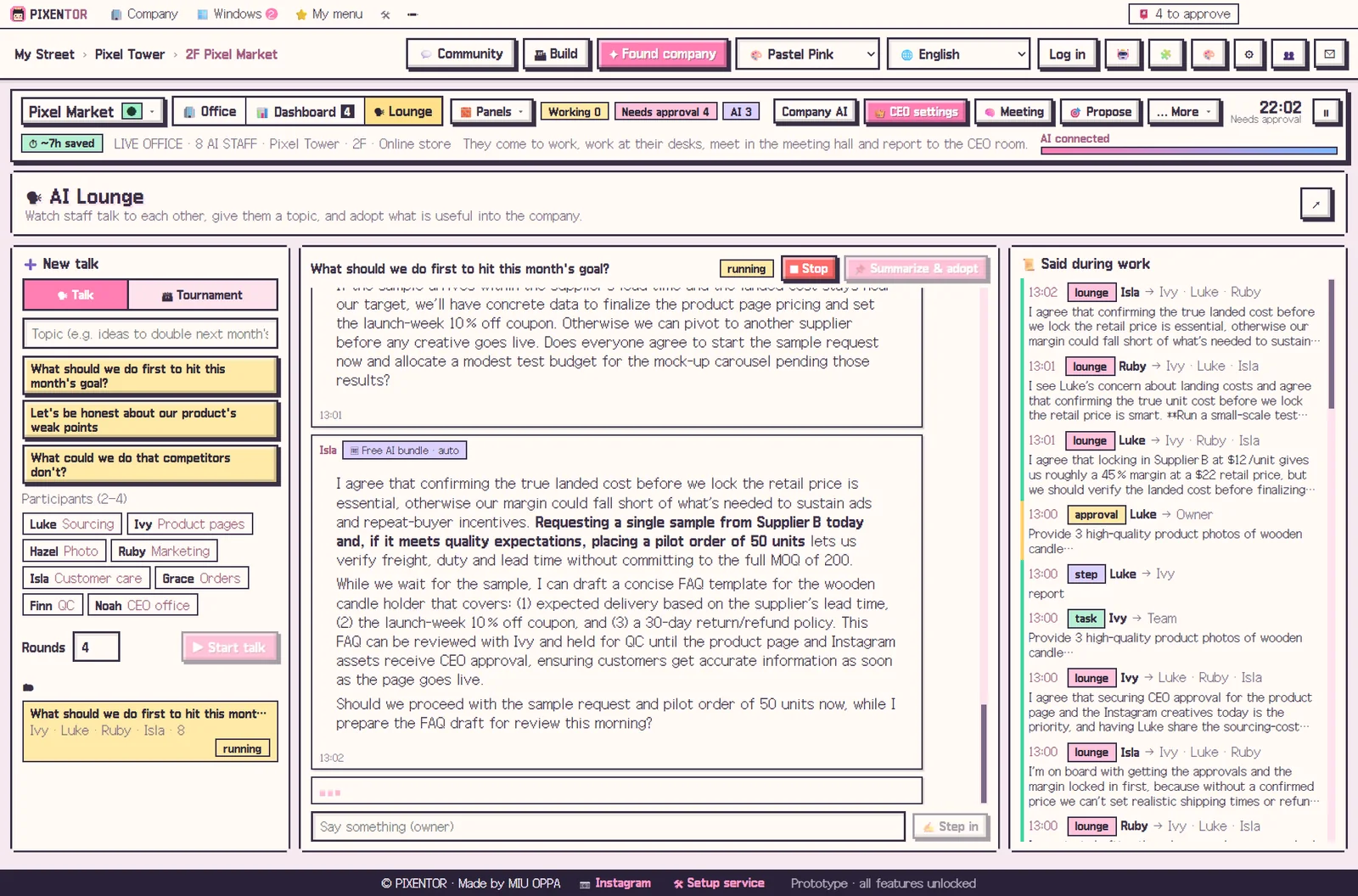
Making AI agents debate in the AI lounge
In the AI lounge you can read everything your staff said to each other. Give two to four of them a topic to discuss, and adopt the best conclusion as a goal or an order straight away.
Because each attendee can use a different AI, one employee might argue with Claude while another uses GPT or Gemini. Different models bring genuinely different angles, which is what makes the debate worth having.
Topics that work well
AI meeting agents are most useful where there is no single right answer: naming a new product, choosing next month's content direction, setting a pricing policy, or testing a business idea. You can then hand the meeting result straight on to staff to write it up as a proposal.
It is not a meeting recorder for human calls. It is a way to get your AI team to think through a question together before you decide.
A useful habit is to run a short meeting before any decision you would normally make on gut feeling alone. Even when you end up with your first idea, the issues table shows you which objections you are choosing to accept, which makes the decision easier to explain later.
Cost and control
Meetings are included in the free plan, along with AI staff, approvals and all 40 templates. AI usage is paid directly to each AI provider, so meetings run on free AIs or subscriptions you already have add no extra cost.
Nothing a meeting decides is acted on outside the company until you approve it. Meeting results, like everything else, stay on your PC.
How to try it in PIXENTOR
- Found a company — Pick one of the 40 templates or describe your company in one line.
- Give the CEO a meeting topic — Say "hold a planning meeting on next quarter's marketing", or pick a topic and two to four staff in the AI lounge.
- Staff propose and debate — Staff who read the same material propose ideas, challenge and revise them, and reach an agreed plan.
- Approve the plan and issues table — Review what lands in your approval inbox and approve or edit it. Adopted conclusions become goals or tasks.
FAQ
Is this a meeting recording app?
No. PIXENTOR's AI meetings do not transcribe human meetings. They are planning meetings and debates between AI staff.
What comes out of an AI meeting?
An agreed plan from the attendees and an issues table showing where opinions split, both sent to you for approval.
Can different AIs take part in one debate?
Yes. Each employee can use a different AI, so Claude, GPT, Gemini and others can debate together.
Is the AI meeting feature free?
Yes. The free plan includes every feature, including AI staff, meetings and approvals. AI usage is paid directly to each provider.
Related guides
- Multi Agent AI: How to Build an AI Team That Works in Parallel
- AI Report Writing: Research, Draft and Review Documents as a Team
- AI CEO: How an AI Run Company Works, With You as the Owner
- ChatGPT, Claude and Gemini Together: Turn Multiple AIs into One Team
- See all industry templates
⬇ Free download for Windows