
AI Content Automation: Run Writing, Images and Video as One Team
Writing is best done by a chat AI, images by an image model, video by a video model and narration by a voice AI. AI content automation is mostly about connecting those AIs in the right order so one piece of content flows from script to finished file. This guide covers which AI content creation tools fit each format, how to approach AI video automation without wasted effort, and how PIXENTOR keeps publishing under your control.
Different formats, different AI content creation tools
No single model is best at everything. Matching each format to a specialist is what makes automated content look less automated.
- Planning and scripts: chat AIs
- Images: FLUX and others
- Video: Runway, Kling and others
- Voice and narration: ElevenLabs and others
Connecting image and video AIs
PIXENTOR connects 28 specialist image, video, music and voice AIs, and their output feeds straight into your staff's work. In the connection center you get a key, copy it and it fills itself in; if you get stuck, a connected AI walks you through eight steps, from signing up to recognizing what the key looks like.
Image and video AI usage is paid directly to each provider. To save money, you can handle planning and scripts with free AIs and use paid AIs only for the scenes that really need them.
AI video automation: check at every stage
In video, changing the script changes the voice and the visuals too. It is more efficient to review the script first and only produce video and audio once it is locked.
PIXENTOR runs departments at the same stage in parallel, and later stages wait only when they need earlier results. Polish and final-review teams check the result at the end.
The same logic applies to other formats. Settle the idea and the text first, then spend paid image or video credits on a version you already agreed on. Staff remember what they need from past work, so your visual style and voice carry over from one piece to the next.
Publishing and uploads only after approval
Finished content arrives in your approval inbox with a review report. Posting, ads and uploads run only after you approve them, and results are saved on your PC.
You also decide how much the AI CEO can do on its own with four permission levels, so you can keep tight control while you learn what the team produces.
Templates for creators
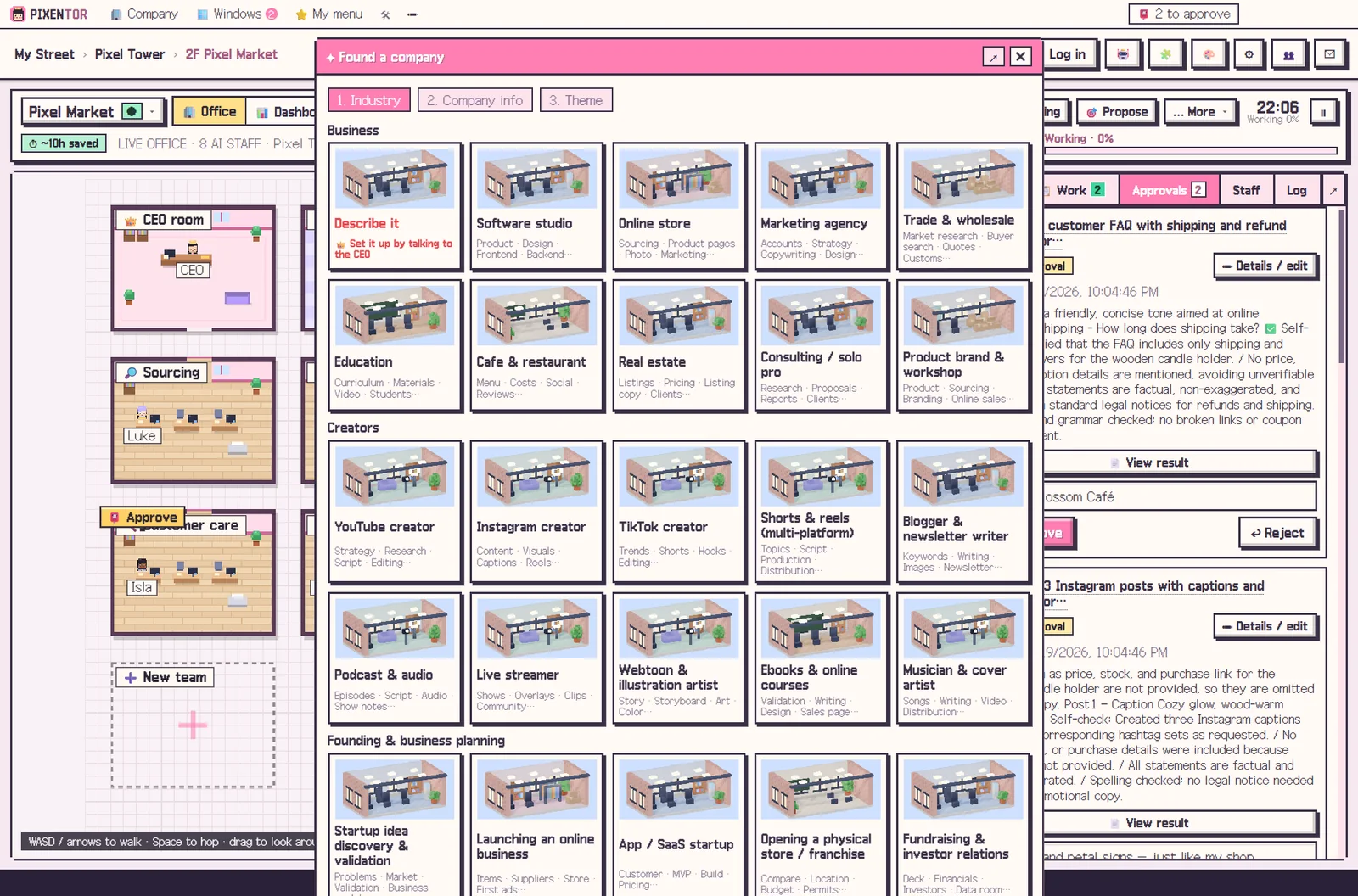
The Creators group of templates includes YouTube, Instagram, TikTok, Shorts & Reels, blog and newsletter, podcast, streamer, webtoon and illustration, e-books and courses, and music and covers. Pick one and the teams, staff, skills and suggested services are ready.
The app is free. Free AIs or subscriptions you already have add no extra cost; paid image and video AIs are billed directly by each provider.
With routines, a recurring format, such as a weekly short video or a daily image post, can be prepared on a schedule so drafts are waiting for you instead of the other way around. You still choose what goes out.
How to try it in PIXENTOR
- Found a creator company — Pick a Creators template such as YouTube, Instagram, TikTok, Shorts & Reels or Podcast.
- Connect image, video and voice AIs — Connect the specialist AIs you need in the connection center and assign them to staff.
- Give the CEO a content task — For example, "make a 30-second product intro video". Script, image, video and voice staff split the work and review each other.
- Approve, then publish — Check the results in your approval inbox. Publishing only happens after approval.
FAQ
Is this AI content automation tool free?
The PIXENTOR app is free to start. If you add paid AIs such as image or video AIs, you pay only those fees, directly to the provider.
Which AI is used for image generation?
You can connect image AIs such as FLUX. There are 28 specialist image, video, music and voice AIs in all.
Can it do AI video creation?
Connect video AIs like Runway or Kling and voice AIs like ElevenLabs, and staff use them directly in their work.
Is content published automatically?
No. Posting and uploads only run after you approve them in the approval inbox.
Related guides
- AI YouTube Automation: Plan, Script and Produce Videos with an AI Team
- AI Instagram Automation: Hand Planning, Images and Captions to an AI Team
- AI Blog Automation: From Draft to Review to Your Approval
- AI Marketing Automation: Hand Copy and Campaign Planning to an AI Team
- See all industry templates
⬇ Free download for Windows